
Details about the order data
| Field Name | Type | Required | Details |
|---|---|---|---|
| id | Number | read only | Internal Omnivore identifier for the order. |
marketplace_code |
String | no | The code for the Marketplace. Possible values here (todo) |
| order_number | String | yes | The order number as created in the Marketplace. This is usually the handle for the orders |
| alt_order_number | String | no | An alternate order number in the Marketplace. Some marketplaces (eg eBay) are using different values depending on where the information is displayed. |
| retailer_order_id | Number | no | When the order is created in the retailer system, this field can contain the order identifier from that system. (usually the database table id) |
| retailer_order_number | String | no | When the order is created in the retailer system, this field can contain the order number from that system. Most Omnivore integrations will get this value from the retailer system in te process of creating the order. |
| status | String | required for update | The status of the order in Omnivore. Todo values |
| total_price | Price object | required for create | The total value of the order, including shipping but excluding additional fees and taxes that are charged by the Marketplace to the buyer |
| additional_fee | Money object | no | Some Marketplaces will charge an extra fee |
| additional_tax | Money | no | Some Marketplaces (eg eBay) will charge the buyer an extra tax depending on their location. |
| customer first_name | String | yes | |
| customer last_name | String | yes | |
| customer email | String | no | |
| shipping_address | Address | yes | Required for the create order method. Raed-only afterwards. |
| billing_address | Address | no | When not provided, the shipping_address data is copied into this field |
| shipping price | Price | yes | This is required when the order is created |
| shipping carrier | String | no | This can be optionally set when the order status is set to "shipped" |
| shipping method | String | yes | A values set by the marketplace |
| shipping tracking_code | String | no | This can be optionally set when the order status is set to "shipped" |
| line_items | LIst of Line Item objects | yes | At least one line item must be provided in an order |
| transactions | List of Money objects | yes | A list of transactions between the Marketplace and the buyer. For most orders that are valid, not cancelled or refunded, there is a single transaction that reflects the amount paid by the buyer and the respective currency, usually the currency of the marketplace. Depending on marketplace type, this element may also contain a transactionId element and a type element, both relating to the payment transaction that occurred in the marketplace. For example type = 'paypal' and transactionId = [PayPal transaction ID] |
| customer_message | String | no | Also called "customer checkout message", it's a free text field where the buyer can provide additional info to facilitate order delivery. |
| created | Datetime | read only | The date and time when the order was created in Omnivore |
| updated | Datetime | read only | The date and time when the order was updated in Omnivore |
| created_in_marketplace | Datetime | required for create | The date and time when the order was created in the Marketplace. |
| Address | |||
| first_name | String | yes | |
| last_name | String | yes | |
| line1 | String | yes | |
| line2 | String | no | |
| city | String | yes | |
| state | String | yes | |
| postcode | String | yes | |
| phone | String | no | |
| country_name | String | no | |
| country_code | String | yes | 2 letter country code, as per https://en.wikipedia.org/wiki/ISO_3166-1_alpha-2 |
| Line Item | |||
| id | Number | read-only | Omnivore internal line item identfier |
| product_sku | String | read-only | The retailer sku of the product. This value is set by Omnivore by decoding the marketplace sku |
| variant_sku | String | read-only | The retailer sku of the variant. This value is set by Omnivore by decoding the marketplace sku |
| marketplace_sku | String | yes | The sku value of the item as known in the marketplace. |
| name | String | no | The name of the product. |
| unit_price | Price | yes | The price of a unit as sold in the Marketplace. |
| quantity | Number | yes | How many units of the item were sold. |
Order Statuses
Retailer Order state changes are made through submitting change via the REST interface or in the Omnivore UI. Certain states are transient and Omnivore will move the order automatically through to its next state once the designated action is completed. Depending on whether the order is pick-up-in-store or ship-from-warehouse, there is a specific lifecycle as shown in the order lifecycle diagram below.
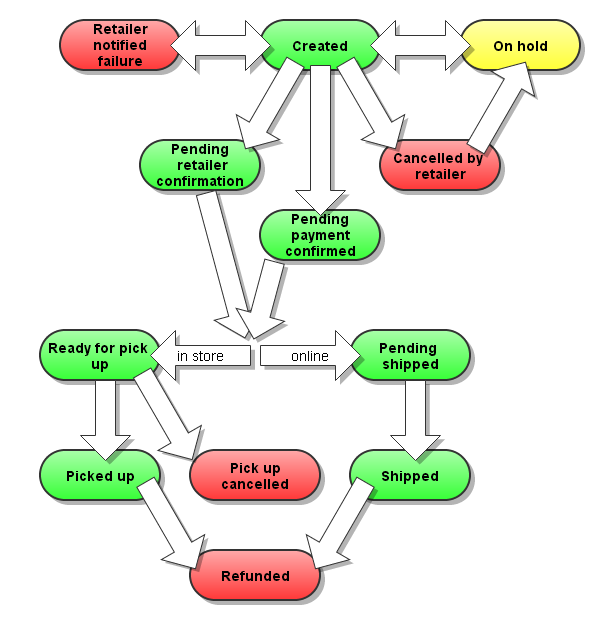
The full list of order statuses are here, in the order of where they are possible in the order lifecycle.
1. 'created' – initial state
(standard flow) : 2. if the retailer integration pushes order to the retailer's webservice: 'pending-payment-confirmed' – pending invoicing
(alternative flow) : 2. if the retailer integration pulls orders from Omnivore: 'pending-retailer-confirmation' – pending invoicing
2.1. 'hold' – order has been put on hold
2.2. 'pending-retailer-cancellation' – retailer has signalled that the order cannot be fulfilled (e.g. zero stock)
2.2.1 'retailer-cancellation' – order now cancelled
2.3. 'retailer-notified-failure' – order could not be sent to retailer
(ship-from-warehouse flow) : 3. 'pending-shipped' – awaiting shipment notification from retailer
(ship-from-warehouse flow) : 3.1. 'payment-confirmed-failure' – invoicing did not succeed
(ship-from-warehouse flow) : 3.2 'shipped' – dispatched to customer
(pick-up-in-store flow) : 3. 'ready-for-pick-up' – ready in the store to be collected by customer
(pick-up-in-store flow) : 3.1. 'pick-up-cancelled' – pick up did not proceed
(pick-up-in-store flow) : 3.2 'picked-up' – collected by customer
4. 'refunded-online' – refund has occurred
Allowed Lifecycle Changes for an Order
The following represents the possible statuses that an order can move into from an initial starting status.
- 'created' > 'pending-retailer-cancellation' OR 'pending-payment-confirmed' OR 'hold' OR 'retailer-notifier-failure
- 'retailer-notified-failure' > 'created'
- 'hold' > 'created'
- 'pending-retailer-cancellation' > 'retailer-cancellation'
- 'pending-payment-confirmed' > 'pending-shipped' OR 'payment-confirmed-failure' OR 'ready-for-pick-up'
- 'pending-shipped' > 'shipped' OR 'refunded-online'
- 'ready-for-pick-up' > 'picked-up' OR 'pick-up-cancelled'
- 'picked-up' > 'refunded-online'
- 'shipped' > 'refunded-online'